Customer 360 Graph Pipeline
A metadata-driven ETL pipeline to unify siloed PostgreSQL databases into a Neo4j graph for advanced fraud detection and customer analysis.
Project Origin
This project is a recreation of one of my first professional projects from my early years as a software engineer. The original version, which is under a strict NDA, used a stack of MSSQL Server, Ontotext GraphDB (a semantic graph database), and Python, with a separate PostgreSQL database just for fetching configurations.
After the graph was populated, my team and I also built a REST API (using a Express Js) on top of it. This API served the aggregated graph data to our front-end applications, providing the rich, connected data that the clients needed.
To showcase this architecture in my portfolio, I’ve rebuilt it from memory using a substitute stack: PostgreSQL (replacing MSSQL) and Neo4j (replacing Ontotext).
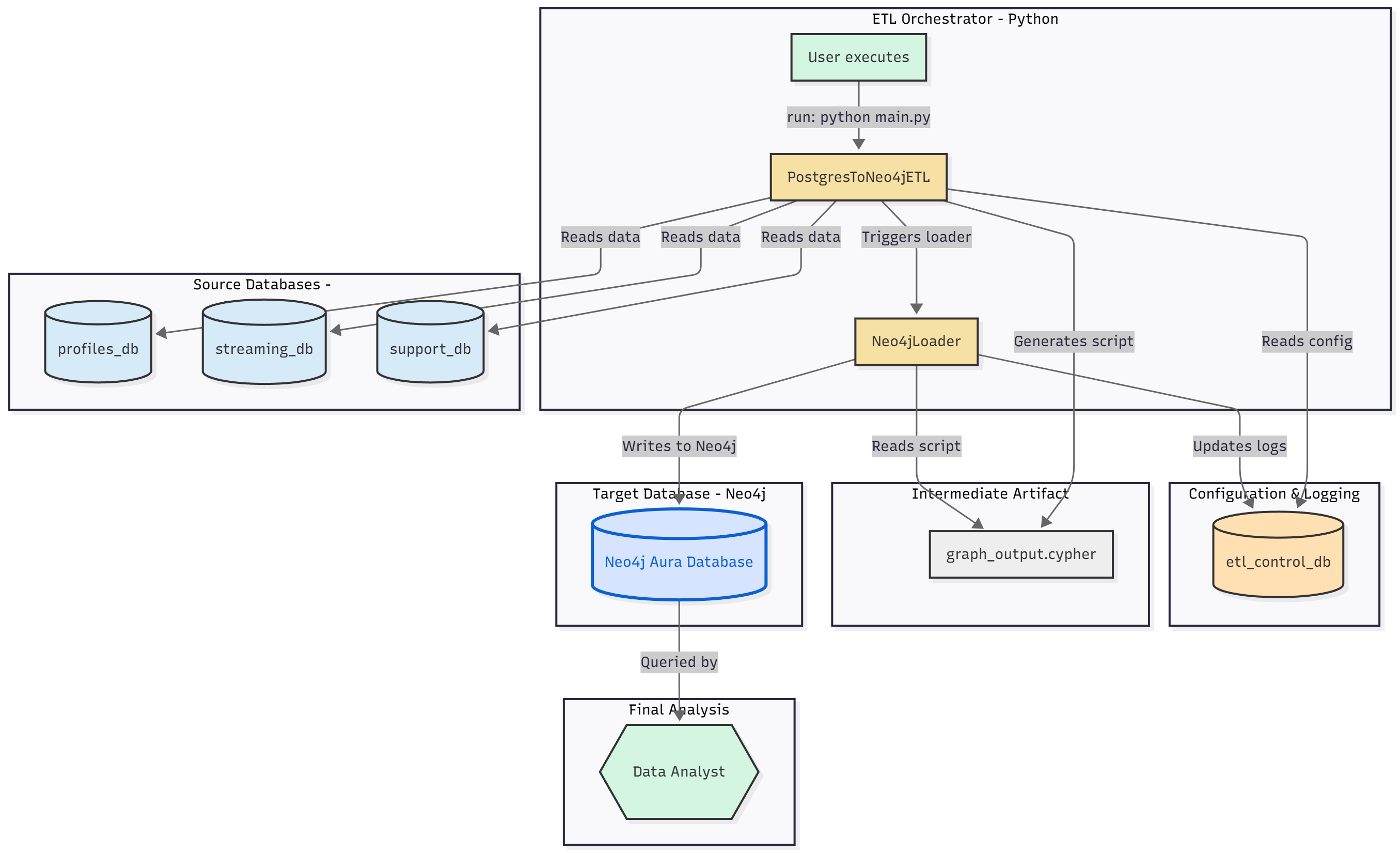
1. The Core Problem: Siloed Data
In a typical enterprise, critical business data is “siloed” across different databases that cannot communicate. This project simulates that real-world problem:
-
profiles_db(Postgres): A modern microservice database for user accounts, subscriptions, and billing. -
streaming_db(Postgres): A high-volume analytics database for user streaming history (play events, IP addresses, devices). -
support_db(Postgres): A legacy support desk database for customer tickets.
This separation makes it “impossible” to answer critical, cross-functional questions in real-time. For example: “How many users who share a payment method with a ‘hacked’ account are also sharing an IP address with other users?“
2. The Solution: A Unified Graph
This pipeline solves the silo problem by extracting, transforming, and loading data from all three sources into a single, unified Neo4j graph.
By connecting data based on shared identifiers (like email, account_id, card_fingerprint), we build a “Customer 360” view that enables powerful analysis that was previously impossible.
3. Key Features
This isn’t just a simple script; it’s a robust, configurable pipeline.
-
100% Metadata-Driven: The entire ETL process is controlled by the
etl_control_db. There are no hardcoded table names, relationships, or credentials in the Python code. -
Dynamic Schema Mapping: You can add/remove tables, exclude sensitive columns (like
hashed_password), and define new node labels just by editing rows in the control database. -
Auditable & Logged: Every ETL run is logged in
etl_run_logs, and every table processed is tracked inetl_table_logs, giving you a complete audit trail. -
Database-First Design: The pipeline reads all configuration, rules, and mappings directly from the database, making it a “single source of truth.”
4. The etl_control_db Architecture
The etl_control_db is the “brains” of the entire pipeline. The Python script is stateless and reads all its instructions from this database.
Here is a breakdown of the key configuration tables:
-
source_databases:- Purpose: A registry of all source databases the ETL can connect to.
- How it’s used: The Python script queries this table at startup. For every database where
is_active = true, it will fetch the connection details and begin processing.
-
field_exclusion_rules:- Purpose: A dynamic “blocklist” to prevent sensitive or unnecessary data from entering the graph.
- How it’s used: Before querying a table (e.g.,
accounts), the script fetches all rules for that table. It dynamically builds itsSELECTstatement to only include columns whereis_excluded = false. This is how PII likehashed_passwordis filtered out.
-
node_label_mappings:- Purpose: Defines the translation from a SQL table name to a Neo4j node label.
- How it’s used: When the script processes the
accountstable, it looks it up here and finds it should create nodes with the label:Account.
-
relationship_mappings:- Purpose: This is the most critical table. It defines all the relationships to create after the nodes are loaded.
- How it’s used: The script loops through this table and uses the columns to generate the final Cypher
MATCH...WHERE...CREATEstatements. For example:from_label:Accountto_label:PaymentMethodrelationship_type:HAS_PAYMENT_METHODjoin_condition:a.account_id = pm.account_id
- This metadata-driven approach means you can add new relationships (even cross-database ones) without ever touching the Python code.
-
etl_run_logs&etl_table_logs:- Purpose: Provides a complete audit trail of the pipeline’s execution.
- How it’s used: The script creates one
etl_run_logsentry when it starts. It then creates anetl_table_logsentry for every table it’s about to process. As it completes each table, it updates the row withstatus,rows_processed, etc., giving you a granular, real-time view of the pipeline’s progress.
5. Pipeline Execution Flow (main.py)
The main.py script acts as the orchestrator, bringing all the components together. It operates in two distinct phases:
Phase 1: ETL (The PostgresToNeo4jETL Class)
This phase reads from all Postgres sources and generates a single, massive Cypher script.
- Init & Connect: The
main()function instantiatesETLConfig(from.env) and passes it to thePostgresToNeo4jETLclass. The class connects to theetl_control_db. - Start Log: It inserts a new row into
etl_run_logsto get alog_idfor this session. - Fetch Sources: It queries the
source_databasestable to get a list of all active databases to process. - Loop & Extract Nodes: It loops through each source database and then loops through each table in that database. For every table (e.g.,
profiles_db.accounts):- It queries
field_exclusion_rulesto dynamically build aSELECTstatement that omits columns likehashed_password. - It queries
node_label_mappingsto find the correct Neo4j label (e.g.,accounts->:Account). - It extracts all data from the table (e.g.,
SELECT account_id, email, full_name... FROM accounts). - It generates Cypher
CREATEstatements for every row and logs the task toetl_table_logs.
- It queries
- Generate Relationships: After all nodes from all sources are generated, it queries the
relationship_mappingstable. It uses this metadata to build the complex, cross-databaseMATCH...WHERE...CREATEstatements that connect the nodes. - Write File: It writes all generated Cypher statements (for nodes and relationships) into a single timestamped file (e.g.,
graph_output_20251102.cypher) and registers it in thecypher_scriptstable.
Phase 2: Load (The Neo4jLoader Class)
This phase takes the generated script and executes it against Neo4j.
- Init & Connect: The
main()function instantiates theNeo4jLoaderwith the Neo4j credentials from the.envfile. The class connects to your Neo4j Aura instance. - Clear Database (Optional): Because
clear_database=Trueis set inmain(), the loader first runsMATCH (n) DETACH DELETE nto wipe the graph clean. - Read & Execute: It reads the
graph_output.cypherfile (passed to it frommain()), splits its content into a list of individual Cypher statements, and executes them one by one. - Update Logs: Finally, it connects to the
etl_control_dbone last time to update thecypher_scriptstable with alast_run_timeto log the successful load.
6. Final Graph Schema
The pipeline automatically generates the following graph structure based on the rules in the control database:
Node Labels
-
(:Account) -
(:Plan) -
(:PaymentMethod) -
(:Subscription) -
(:Media) -
(:PlayEvent) -
(:Ticket) -
(:Tag) -
(:TicketTagLink)
Relationships
-
(:Account) -[:HAS_PAYMENT_METHOD]-> (:PaymentMethod) -
(:Account) -[:HAS_SUBSCRIPTION]-> (:Subscription) -
(:Subscription) -[:SUBSCRIBED_TO]-> (:Plan) -
(:PlayEvent) -[:PLAYED]-> (:Media) -
(:Ticket) -[:TAGGED_WITH]-> (:Tag) -
(:Account) -[:SUBMITTED]-> (:Ticket)(Linksprofiles_dbtosupport_db) -
(:Account) -[:WATCHED]-> (:PlayEvent)(Linksprofiles_dbtostreaming_db)
7. The “Payoff”: High-Impact Analytical Queries
With the unified graph, you can now run powerful analytical queries that would crash a SQL server. This list contains the 10 queries that were validated to return data with the loaded sample set.
IMPORTANT: These queries may use multiple MATCH and WITH clauses. You must copy and run each query as a single, complete block from the first MATCH to the final RETURN or LIMIT. Running them line by line will cause an “Incomplete query” error.
FRAUD & CUSTOMER 360 ANALYTICS
1. PAYMENT FRAUD: Multiple accounts using same credit card
MATCH (a1:Account)-[:HAS_PAYMENT_METHOD]->(pm1:PaymentMethod)
MATCH (a2:Account)-[:HAS_PAYMENT_METHOD]->(pm2:PaymentMethod)
WHERE a1.account_id < a2.account_id
  AND pm1.card_fingerprint = pm2.card_fingerprint
RETURN a1.email AS account_1,
       a2.email AS account_2,
       pm1.card_fingerprint AS shared_card_fingerprint,
       pm1.card_type AS card_type,
       '***' + pm1.card_last_four AS card_ending
ORDER BY shared_card_fingerprint;
2. CUSTOMER LIFETIME VALUE: Complete profile
MATCH (a:Account)
OPTIONAL MATCH (a)-[:HAS_SUBSCRIPTION]->(s:Subscription)-[:SUBSCRIBED_TO]->(p:Plan)
OPTIONAL MATCH (a)-[:WATCHED]->(pe:PlayEvent)-[:PLAYED]->(m:Media)
OPTIONAL MATCH (a)-[:SUBMITTED]->(t:Ticket)
WITH a, s, p,
     COUNT(DISTINCT pe) AS total_streams,
     COUNT(DISTINCT m) AS unique_content,
     COUNT(DISTINCT t) AS tickets,
     duration.between(a.created_at, datetime()).months AS months_active
RETURN a.email,
       a.full_name,
       p.plan_name AS plan,
       toFloat(p.monthly_fee) * months_active AS estimated_revenue,
       total_streams,
       unique_content,
       tickets,
       months_active,
       CASE
         WHEN total_streams > 20 THEN 'Power User'
         WHEN total_streams > 10 THEN 'Regular User'
         WHEN total_streams > 0 THEN 'Casual User'
         ELSE 'At-Risk (No Activity)'
       END AS segment
ORDER BY estimated_revenue DESC
LIMIT 20;
3. CHURN PREDICTION: Find at-risk customers
// NOTE: datetime() is hardcoded to '2025-11-03' to work with sample data
WITH datetime('2025-11-03T00:00:00') AS now
MATCH (a:Account)-[:HAS_SUBSCRIPTION]->(s:Subscription)
OPTIONAL MATCH (a)-[:WATCHED]->(pe:PlayEvent)
WHERE pe.event_timestamp > now - duration({days: 30})
OPTIONAL MATCH (a)-[:SUBMITTED]->(t:Ticket)
WHERE t.created_at > now - duration({days: 30})
WITH a, s,
     COUNT(DISTINCT pe) AS recent_streams,
     COUNT(DISTINCT t) AS recent_tickets,
     duration.between(a.created_at, now).months AS age_months
WHERE s.status IN ['active', 'Active']
RETURN a.email,
       recent_streams,
       recent_tickets,
       age_months,
       CASE
         WHEN recent_streams = 0 AND recent_tickets > 0 THEN 'HIGH RISK - Problems + No Usage'
         WHEN recent_streams = 0 THEN 'HIGH RISK - No Activity'
         WHEN recent_streams < 5 THEN 'MEDIUM RISK - Low Engagement'
         ELSE 'LOW RISK - Active User'
       END AS churn_risk
ORDER BY
  recent_streams ASC,
  recent_tickets DESC
LIMIT 20;
4. GENRE PREFERENCES: What each user loves
MATCH (a:Account)-[:WATCHED]->(pe:PlayEvent)-[:PLAYED]->(m:Media)
WITH a, m.genre AS genre, COUNT(*) AS watches
ORDER BY a.account_id, watches DESC
WITH a, COLLECT({genre: genre, count: watches})[0..3] AS top_genres
RETURN a.email,
       a.full_name,
       [g IN top_genres | g.genre + ' (' + g.count + ' plays)'] AS favorite_genres
LIMIT 20;
BUSINESS INTELLIGENCE
5. REVENUE BY PLAN
MATCH (p:Plan)<-[:SUBSCRIBED_TO]-(s:Subscription)<-[:HAS_SUBSCRIPTION]-(a:Account)
WHERE s.status IN ['active', 'Active']
OPTIONAL MATCH (a)-[:WATCHED]->(pe:PlayEvent)
WITH p,
     COUNT(DISTINCT a) AS subscribers,
     toFloat(p.monthly_fee) * COUNT(DISTINCT a) AS monthly_revenue,
     COUNT(DISTINCT pe) AS total_streams
RETURN p.plan_name,
       subscribers,
       monthly_revenue,
       ROUND(toFloat(total_streams) / subscribers, 1) AS avg_streams_per_user,
       p.max_devices
ORDER BY monthly_revenue DESC;
6. MOST POPULAR CONTENT
MATCH (m:Media)<-[:PLAYED]-(pe:PlayEvent)
WITH m,
     COUNT(*) AS total_events,
     COUNT(CASE WHEN pe.action IN ['play', 'START'] THEN 1 END) AS starts,
     COUNT(CASE WHEN pe.action IN ['stop', 'FINISH'] THEN 1 END) AS completions
WHERE starts > 0
RETURN m.title,
       m.genre,
       m.media_type,
       m.release_date,
       starts AS play_starts,
       completions,
       ROUND(100.0 * completions / starts, 1) AS completion_rate_pct
ORDER BY starts DESC
LIMIT 20;
7. DEVICE ANALYSIS
MATCH (pe:PlayEvent)<-[:WATCHED]-(a:Account)
WITH pe.device_fingerprint AS device,
     COUNT(*) AS usage_count,
     COLLECT(DISTINCT a.email) AS users
ORDER BY usage_count DESC
LIMIT 10
OPTIONAL MATCH (a2:Account {email: users[0]})-[:SUBMITTED]->(t:Ticket)-[:TAGGED_WITH]->(tag:Tag)
WHERE tag.tag_name IN ['Technical', 'Playback']
RETURN device,
       usage_count,
       SIZE(users) AS unique_users,
       COUNT(DISTINCT t) AS technical_tickets
ORDER BY usage_count DESC;
ADVANCED NETWORK ANALYSIS
8. COMPLETE CUSTOMER JOURNEY
MATCH (a:Account {email: 'john.smith@email.com'})
OPTIONAL MATCH (a)-[:HAS_SUBSCRIPTION]->(s:Subscription)-[:SUBSCRIBED_TO]->(p:Plan)
OPTIONAL MATCH (a)-[:HAS_PAYMENT_METHOD]->(pm:PaymentMethod)
OPTIONAL MATCH (a)-[:WATCHED]->(pe:PlayEvent)-[:PLAYED]->(m:Media)
OPTIONAL MATCH (a)-[:SUBMITTED]->(t:Ticket)-[:TAGGED_WITH]->(tag:Tag)
RETURN a.email AS customer,
       a.created_at AS signup_date,
       p.plan_name AS plan,
       s.status AS subscription_status,
       pm.card_type + ' •••• ' + pm.card_last_four AS payment,
       COUNT(DISTINCT m) AS content_watched,
       COUNT(DISTINCT pe) AS total_streams,
       COUNT(DISTINCT t) AS tickets,
       COLLECT(DISTINCT tag.tag_name)[0..5] AS ticket_topics;
9. MOST ACTIVE STREAMERS
MATCH (a:Account)-[:WATCHED]->(pe:PlayEvent)-[:PLAYED]->(m:Media)
WITH a,
     COUNT(DISTINCT pe) AS total_streams,
     COUNT(DISTINCT m) AS unique_content,
     COUNT(DISTINCT m.genre) AS genres_watched,
     COLLECT(DISTINCT m.genre)[0..5] AS top_genres
ORDER BY total_streams DESC
LIMIT 10
RETURN a.email,
       a.full_name,
       total_streams,
       unique_content,
       genres_watched,
       top_genres;
10. ACCOUNT ACTIVITY HEATMAP
MATCH (pe:PlayEvent)
WITH pe.event_timestamp.hour AS hour_of_day, COUNT(*) AS streams
ORDER BY hour_of_day
RETURN hour_of_day,
       streams,
       CASE
         WHEN streams > 5 THEN 'Peak'
         WHEN streams > 3 THEN 'High'
         WHEN streams > 1 THEN 'Medium'
         ELSE 'Low'
       END AS activity_level
ORDER BY hour_of_day;
8. How to Run
-
Setup PostgreSQL:
-
Create your four databases:
etl_control_db,profiles_db,streaming_db,support_db. -
Run all the
_schema.sqlandsample_data.sqlscripts to create the tables and load the sample data. -
Important: You must update the
source_databasestable insideetl_control_dbwith the correctdb_passwordfor your three source DBs.
-
-
Environment Setup:
-
Create a
.envfile in the root directory:# Credentials for the main Control Database ETL_DB_HOST=localhost ETL_DB_PORT=5432 ETL_DB_NAME=etl_control_db ETL_DB_USER=your_postgres_user ETL_DB_PASSWORD=your_postgres_password # Credentials for the target Neo4j Aura Database NEO4J_URI=neo4a+s://your-aura-db-id.databases.neo4j.io NEO4J_USERNAME=neo4j NEO4J_PASSWORD=your_neo4j_password -
Install Python dependencies:
pip install psycopg2-binary neo4j python-dotenv
-
-
Run the Pipeline:
-
Execute the main script. This will:
-
Read all data from Postgres.
-
Generate a massive
graph_output_[timestamp].cypherfile. -
Connect to Neo4j (clearing it first, if
clear_database=True). -
Execute the generated Cypher script to build the graph.
-
-
python main.py
-