Real-Time Graph CDC Pipeline
A modern evolution of my professional graph project — transforming batch-based CDC into a living, breathing real-time stream of data.
Project Evolution: From Batch to Real-Time
This project originates from one of my professional works, where the data pipeline was built on Microsoft SQL Server (MSSQL) using its built-in Change Data Capture (CDC) feature.
In that system, the CDC process tracked inserts, updates, and deletes directly from the transaction log, while a Python batch ETL handled the heavy lifting, rebuilding the entire customer graph once a month.
To simulate that environment in my personal portfolio (since the real code is under NDA), I recreated the entire design using PostgreSQL as a substitute for MSSQL.
This mimic version kept the same architecture and logic, allowing me to freely showcase the system’s functionality without disclosing any proprietary work.
The earlier approach had two layers:
- Batch ETL (Monthly): Loaded and rebuilt the entire Ontotext graph from relational data sources.
- CDC Script (Every 4 Hours): Queried MSSQL’s CDC tables to apply incremental updates.
While this worked reliably, it wasn’t truly real time.
Users couldn’t see fresh data until the next 4-hour cycle, and as data volume grew, the delay became more noticeable, especially for fraud detection and analytics use cases.
The Real-Time Redesign
To overcome these limitations, I re-engineered the entire pipeline around real-time CDC streaming.
Instead of polling CDC tables on a schedule, this new version listens directly to PostgreSQL’s Write-Ahead Log (WAL) using Debezium, ensuring every change is captured the moment it happens.
The redesigned system now uses:
- Debezium → Captures database changes at the log level
- Redpanda (Kafka-compatible) → Streams change events efficiently
- Python CDC Consumer → Updates Neo4j nodes and relationships in real time
This shift transforms the pipeline from a scheduled sync process into a continuous data stream, keeping the graph perfectly aligned with its source databases: no waiting windows, no stale data.
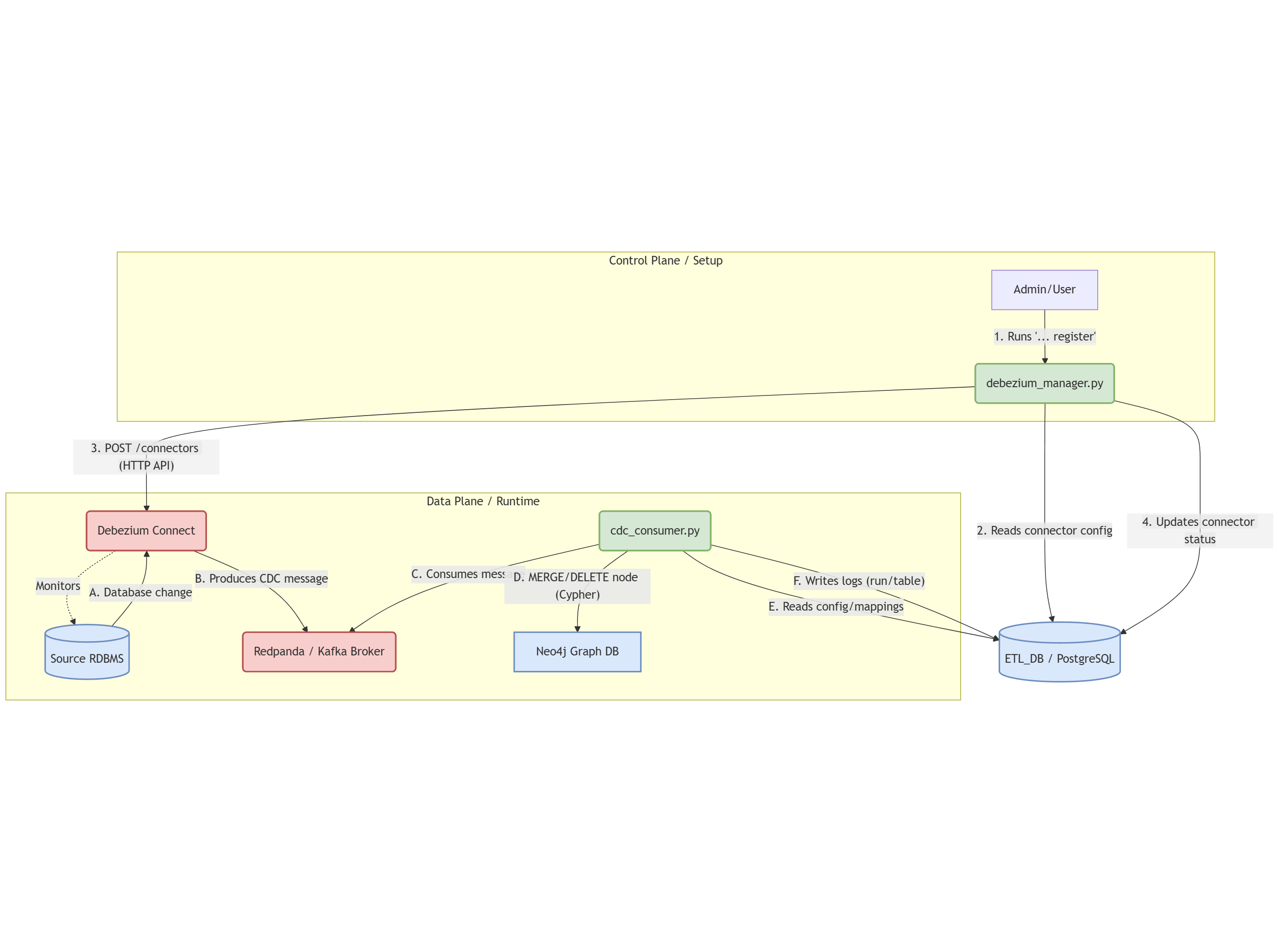
1. Architecture Overview
The real-time CDC pipeline operates in three layers:
Layer 1: Change Data Capture (Debezium)
Debezium connectors monitor PostgreSQL’s Write-Ahead Log (WAL) and capture every INSERT, UPDATE, and DELETE operation:
PostgreSQL WAL → Debezium Connector → Kafka/Redpanda TopicsKey Benefits:
- Zero application code changes required
- Sub-second latency from database to event stream
- Complete change history with before/after states
- No polling or table scanning
Layer 2: Event Streaming (Redpanda)
Redpanda acts as the messaging backbone, organizing changes into topics:
Topic Structure:
├── postgres-source-v1-profiles.public.accounts
├── postgres-source-v1-profiles.public.tickets
├── postgres-source-v1-support.public.accounts
└── postgres-source-v1-support.public.tickets
Why Redpanda over Standard Kafka:
- Kafka API compatible (no code changes)
- 10x lower latency
- Simpler deployment (no Zookeeper)
- Better resource efficiency
Layer 3: Real-Time Graph Sync (Python CDC Consumer)
The cdc_consumer.py script continuously processes CDC events and updates Neo4j:
Kafka Consumer → Process CDC Event → Update Neo4j Node
     ↓
  Log to Control DB (cdc_run_logs, cdc_table_logs)
2. CDC Consumer Architecture
The CDC consumer is designed with the same metadata-driven philosophy as Part 1, but optimized for streaming:
Core Components
CDCConsumer Class:
- Connects to the
etl_control_dbto load CDC configuration - Subscribes to Redpanda topics for CDC-enabled tables
- Processes Debezium messages in real-time
- Executes Cypher queries to update Neo4j
- Logs all operations for audit and monitoring
Configuration Loading:
# Dynamically loads from etl_control_db:
- node_label_mappings (with is_cdc_enabled = true)
- field_exclusion_rules (with is_cdc_excluded = true)
- primary_keys for MERGE operations
- cdc_connectors for Kafka topic configuration
Message Processing Flow:
- Consume: Receive Debezium CDC message from Kafka
- Parse: Extract operation type (
c=create,u=update,d=delete,r=snapshot) - Filter: Apply field exclusion rules (e.g., remove
hashed_password) - Transform: Build Cypher query with sanitized values
- Execute: Run MERGE or DELETE against Neo4j
- Log: Update
cdc_table_logswith message count
3. Debezium Message Format
The consumer handles the flattened Debezium message format:
{
  "op": "c",
  "before": null,
  "after": {
    "account_id": "92f70463-4e74-431f-a567-8a0f7226b204",
    "email": "user@example.com",
    "full_name": "John Doe",
    "created_at": "2025-11-08T16:09:50.004528Z"
  },
  "source": {
    "version": "2.6.2.Final",
    "connector": "postgresql",
    "name": "postgres-source-v1-profiles",
    "db": "profiles_db",
    "schema": "public",
    "table": "accounts",
    "txId": 5861,
    "lsn": 4872723424
  },
  "ts_ms": 1762618190487
}
Operation Types:
c(create): INSERT operation →MERGEin Neo4ju(update): UPDATE operation →MERGEin Neo4j (upsert)d(delete): DELETE operation →DETACH DELETEin Neo4jr(read): Initial snapshot →MERGEin Neo4j
4. The Control Database: CDC Extension
The etl_control_db from Part 1 is extended with CDC-specific tables:
New CDC Tables
cdc_connectors:
- connector_id: Unique identifier
- source_id: Links to source_databases
- connector_name: Debezium connector name
- kafka_topic_prefix: Topic naming convention
- is_active: Enable/disable connectorcdc_run_logs:
- log_id: Unique run identifier
- run_start_time: When CDC consumer started
- run_end_time: When CDC consumer stopped
- status: running | stopped | failed
- total_messages_processed: Count across all tablescdc_table_logs:
- table_log_id: Unique identifier
- log_id: Links to cdc_run_logs
- source_id: Which source database
- table_name: Which table being tracked
- messages_processed: Real-time message count
- status: processing | completed | failed
- is_progressing: Boolean flag for monitoring
- start_time, end_time: Timestamps
Enhanced Tables from Part 1
node_label_mappings:
- Added
is_cdc_enabledcolumn to mark tables for real-time sync - When true, the CDC consumer subscribes to that table’s topic
field_exclusion_rules:
- Added
is_cdc_excludedcolumn to filter fields in CDC events - Separate from batch ETL exclusions for flexibility
5. Real-Time Operation Examples
INSERT Operation
-- Execute in PostgreSQL
INSERT INTO accounts (email, hashed_password, full_name)
VALUES ('new.user@email.com', 'hashed_pwd', 'New User');
What Happens:
- PostgreSQL writes to WAL
- Debezium captures change and publishes to Kafka
- CDC Consumer receives message
- Neo4j node created with MERGE
UPDATE Operation
-- Execute in PostgreSQL
UPDATE accounts
SET full_name = 'Updated Name'
WHERE email = 'user@email.com';
CDC Consumer Log:
[DEBUG] Processing message - Table: accounts, Operation: u
[DEBUG] UPDATE data: {account_id: '...', email: '...', full_name: 'Updated Name'}
[OK] Updated Account (account_id=...)
[DEBUG] Neo4j counters - properties_set: 3
DELETE Operation
-- Execute in PostgreSQL
DELETE FROM accounts WHERE email = 'user@email.com';
CDC Consumer Cypher:
MATCH (n:Account {account_id: '...'})
DETACH DELETE n
Removes node and all relationships instantly.
6. Monitoring & Observability
Real-Time Logs
The CDC consumer provides comprehensive logging:
[LOG] Started CDC run log (ID: 4)
[LOG] Started table log for accounts (ID: 7)
[LOG] Started table log for tickets (ID: 8)
[INFO] Waiting for messages...
[DEBUG] Processing message - Topic: postgres-source-v1-profiles.public.accounts
[OK] Updated Account (account_id=...)
[PROGRESS] Processed 100 messages
[HEARTBEAT] Consumer active - 245 messages processed so far
Database Monitoring
Check Current CDC Run:
SELECT
    log_id,
    run_start_time,
    status,
    total_messages_processed,
    run_end_time - run_start_time AS duration
FROM cdc_run_logs
WHERE status = 'running'
ORDER BY run_start_time DESC;
Table Processing Status:
SELECT
    tl.table_name,
    tl.status,
    tl.messages_processed,
    tl.is_progressing,
    EXTRACT(EPOCH FROM (NOW() - tl.start_time)) AS seconds_running
FROM cdc_table_logs tl
JOIN cdc_run_logs rl ON rl.log_id = tl.log_id
WHERE rl.status = 'running'
ORDER BY tl.messages_processed DESC;
CDC Performance Metrics:
SELECT
    table_name,
    AVG(messages_processed) AS avg_messages,
    MAX(messages_processed) AS max_messages,
    AVG(EXTRACT(EPOCH FROM (end_time - start_time))) AS avg_duration_seconds
FROM cdc_table_logs
WHERE status = 'completed'
GROUP BY table_name
ORDER BY avg_messages DESC;
7. Configuration Examples
Enable CDC for a Table
-- Step 1: Mark table as CDC-enabled
UPDATE node_label_mappings
SET is_cdc_enabled = true
WHERE table_name = 'subscriptions';

-- Step 2: Add field exclusions for CDC
INSERT INTO field_exclusion_rules
(table_name, column_name, is_cdc_excluded)
VALUES
('subscriptions', 'internal_notes', true),
('subscriptions', 'stripe_customer_id', true);

-- Step 3: Restart CDC consumer to pick up changes
Configure Debezium Connector
INSERT INTO cdc_connectors
(source_id, connector_name, kafka_topic_prefix, is_active)
VALUES
(1, 'postgres-profiles-connector', 'postgres-source-v1-profiles', true);
Disable CDC for Maintenance
-- Temporarily disable CDC for a table
UPDATE node_label_mappings
SET is_cdc_enabled = false
WHERE table_name = 'accounts';

-- CDC consumer will skip this table until re-enabled
8. Testing the Pipeline
End-to-End Test
Terminal 1: Start CDC Consumer
python cdc_consumer.pyTerminal 2: Execute SQL Changes
-- Test INSERT
INSERT INTO accounts (email, hashed_password, full_name)
VALUES ('test@example.com', 'hashed', 'Test User');

-- Test UPDATE
UPDATE accounts
SET full_name = 'Test User Updated'
WHERE email = 'test@example.com';

-- Test DELETE
DELETE FROM accounts WHERE email = 'test@example.com';
Terminal 3: Monitor Neo4j
// Watch for changes in real-time
MATCH (a:Account)
WHERE a.email CONTAINS 'test'
RETURN a
Expected Results:
- INSERT: Node appears in Neo4j within
- UPDATE: Properties update within
- DELETE: Node disappears within
9. Lessons Learned
From Professional Project to Modern Architecture:
The original MSSQL CDC implementation taught me that change data capture is powerful but implementation matters. This rebuild with Debezium and Redpanda shows:
- Separation of Concerns: Debezium handles CDC complexity, Python focuses on business logic
- Metadata-Driven Design: Configuration in database makes system adaptable without code changes
- Observability First: Comprehensive logging and monitoring from day one
- Event Streaming Standards: Kafka API compatibility ensures ecosystem compatibility
- Real-Time isn’t Optional: Modern applications demand sub-second data freshness
This project demonstrates the evolution from traditional batch ETL to modern streaming architectures, a journey many enterprises are taking today.
Related Projects: